PAK PLAYER ULTIMATE V7 Free Download for Windows
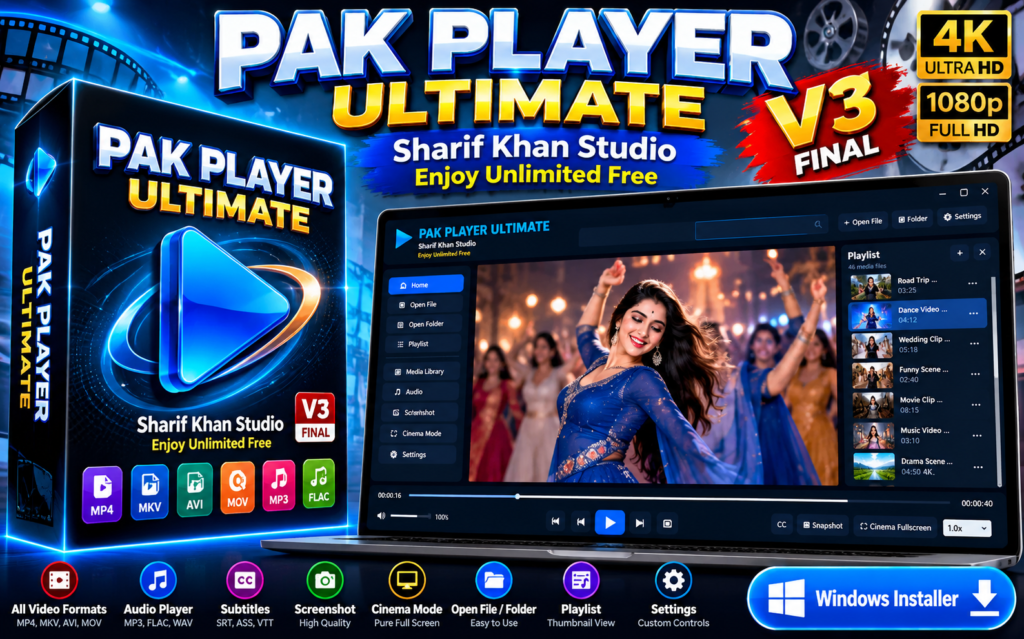
PAK PLAYER ULTIMATE V7 Free Download for Windows – HD Video & Audio Player
Download PAK PLAYER ULTIMATE V7 Free for Windows PC – Enjoy HD Video Playback, Music, Playlists, Cinema Fullscreen Mode and Advanced Timeline Controls.
Are you searching for a free, modern, and easy-to-use video and audio player for your Windows computer? PAK PLAYER ULTIMATE V7, developed by Sharif Khan Studio, is a powerful desktop media player designed to make your entertainment experience simple, enjoyable, and convenient.
Whether you want to watch your favorite movies, play downloaded videos, listen to music, or manage your local media collection, PAK PLAYER ULTIMATE V7 provides a stylish interface with practical playback features.
This latest V7 release introduces improved Cinema Fullscreen playback controls, allowing users to manage video playback without leaving fullscreen mode.
What Is PAK PLAYER ULTIMATE V7?
PAK PLAYER ULTIMATE V7 is a free Windows desktop media player created by Sharif Khan Studio. It provides an organized environment for playing local video and audio files.
The software features a beautiful dark-blue interface, a convenient media playlist, video thumbnail previews, playback speed options, volume adjustment, screenshot functionality, and a dedicated fullscreen cinema experience.
Unlike basic video players, PAK PLAYER ULTIMATE V7 focuses on providing accessible media controls and a clean viewing experience.
Key Features of PAK PLAYER ULTIMATE V7
1. HD Video Playback
Enjoy your favorite videos with a clean viewing interface. PAK PLAYER ULTIMATE V7 supports local video playback, making it convenient to watch movies, short clips, personal recordings, and downloaded content.
Actual playback quality depends on the video file, supported codecs, and computer hardware.
2. Video and Audio Player
Use a single application to enjoy both video and audio files. Open your favorite media directly from your computer without switching between multiple applications.
3. Cinema Fullscreen Mode
One of the most exciting features of PAK PLAYER ULTIMATE V7 is its Cinema Fullscreen Mode.
Watch videos across your screen while the main application sidebar and playlist remain hidden.
The fullscreen interface includes convenient playback controls, allowing you to manage the video without returning to the normal player window.
4. Fullscreen Playback Controls
The V7 Cinema Mode includes:
- Play and Pause buttons
- Stop playback button
- Previous and Next media controls
- Video playback timeline
- Current time and total duration
- Volume adjustment
- Exit Fullscreen button
These controls make watching videos more convenient.
5. Click-to-Seek Timeline
Want to skip directly to your favorite moment?
Simply click anywhere on the video timeline to move playback to that position.
This functionality works in the main player and Cinema Fullscreen Mode, where supported by the selected media file.
6. Playlist Management
PAK PLAYER ULTIMATE V7 includes a dedicated playlist panel where users can browse and select media files.
The playlist helps organize videos and makes switching between different files easier.
7. Video Thumbnail Previews
The media playlist can display video thumbnail previews, helping users recognize and select their favorite content quickly.
Thumbnail availability may depend on the selected media file.
8. Modern Dark Interface
Enjoy an attractive dark-themed player with blue highlights, simple navigation, and clearly organized media controls.
The interface is designed for convenient everyday use.
9. Volume and Playback Speed Controls
Adjust the audio volume according to your preferences and use the playback speed selector when you want to watch supported videos at a different speed.
10. Screenshot and Subtitle Options
The player provides screenshot functionality for capturing video frames and subtitle controls for compatible media.
What’s New in PAK PLAYER ULTIMATE V7?
PAK PLAYER ULTIMATE V7 improves the fullscreen viewing experience compared with previous versions.
The important enhancements include:
- Fullscreen video progress timeline
- Click-to-seek functionality in Cinema Mode
- Fullscreen Play, Pause, and Stop controls
- Previous and Next navigation in fullscreen
- Fullscreen volume adjustment
- Visible video duration and current playback time
- Convenient Exit Fullscreen button
- Improved playback accessibility
These improvements make V7 a more convenient version for everyday media playback.
How to Download PAK PLAYER ULTIMATE V7
Downloading the software is simple.
Step 1: Visit the official Sharif Khan Studio website.
Step 2: Open the PAK PLAYER ULTIMATE V7 download page.
Step 3: Click the Free Download button.
Step 4: Save the software ZIP file to your computer.
Step 5: Extract the ZIP file and locate the Windows setup installer.
Step 6: Follow the installation instructions included in the README file.
Always download software from the official website or another trusted source.
How to Install PAK PLAYER ULTIMATE V7 on Windows
- Download the PAK PLAYER ULTIMATE V7 ZIP package.
- Right-click the ZIP file and select Extract All.
- Open the extracted folder.
- Find the PAK PLAYER ULTIMATE V7 setup application.
- Double-click the installer.
- Follow the installation wizard.
- Complete the installation.
- Open PAK PLAYER ULTIMATE from your Desktop or Start menu.
- Click Open File or Open Folder.
- Select your favorite video or audio file and enjoy playback.
How to Use Cinema Fullscreen Mode
Open a video in PAK PLAYER ULTIMATE V7 and select Cinema Fullscreen.
The video will appear in a dedicated fullscreen viewing environment.
Use the playback buttons to pause, resume, or stop the video.
Click the timeline to move to another point in the video. You can also adjust the volume and switch between media files.
When you want to return to the main player, click Exit Fullscreen.
PAK PLAYER ULTIMATE V7 – Software Information
Software Name: PAK PLAYER ULTIMATE
Version: V7
Developer: Sharif Khan Studio
Category: Video Player / Audio Player / Multimedia Software
Platform: Windows PC
Architecture: 64-bit
License: Free
Installation Type: Windows EXE Setup
Official Website: https://sharifkhanstudio.com
Why Download PAK PLAYER ULTIMATE V7?
PAK PLAYER ULTIMATE V7 combines useful media playback features in a single desktop application.
Its modern design, playlist functionality, easy navigation, and improved fullscreen controls make it a convenient choice for users who want to watch videos and listen to audio on Windows.
The ability to seek directly from the fullscreen timeline is especially useful when reviewing long videos, skipping introductions, or replaying favorite scenes.
Frequently Asked Questions (FAQs)
Is PAK PLAYER ULTIMATE V7 free?
Yes. PAK PLAYER ULTIMATE V7 is offered as a free Windows media player by Sharif Khan Studio.
Can I play videos in fullscreen?
Yes. The software includes Cinema Fullscreen Mode with dedicated playback controls.
Can I pause videos without exiting fullscreen?
Yes. V7 provides Play, Pause, and Stop controls directly inside Cinema Fullscreen Mode.
Can I jump to a specific part of a video?
Yes. Click the video progress timeline to seek to your preferred position, provided the media supports seeking.
Does PAK PLAYER ULTIMATE support audio playback?
Yes. The application includes audio playback functionality.
Can I create or browse playlists?
The software includes a playlist panel for browsing and selecting media files.
Is PAK PLAYER ULTIMATE available for Windows?
Yes. This release is designed for Windows desktop computers.
Where can I download the latest version?
Visit the official Sharif Khan Studio website for software downloads and updates.
Download PAK PLAYER ULTIMATE V7 Free
PAK PLAYER ULTIMATE V7 – Free Windows Media Player
Enjoy video playback, audio entertainment, playlist previews, fullscreen cinema controls, and click-to-seek timeline functionality.
DOWNLOAD NOW – PAK PLAYER ULTIMATE V7 FREE
Official Website: https://sharifkhanstudio.com
Insert your website’s actual Free Download button here.
About Sharif Khan Studio
Sharif Khan Studio develops and shares digital tools, software, audio resources, creative utilities, and helpful content for creators and computer users.
Explore our website to discover more free software, creative resources, and useful digital tools.
Sharif Khan Studio – Enjoy Unlimited Free
© 2026 Sharif Khan Studio. All Rights Reserved.
PAK PLYER ULTIMATE FREE
Free download. No payment required. Donations are voluntary and do not affect access.